Friday, March 18, 2011

Monday, March 7, 2011
You’ve got better things to do than wait in traffic
You’ve got better things to do than wait in traffic: "(Cross-posted on the LatLong Blog and Mobile Blog)
Ever been stuck in traffic, only to find out you’d have been better off going a bit out of your way to take a less congested route? If you’re like me, you probably hear the traffic report telling you what you already know: traffic is bad on the road you’re currently on, and you should have taken another. It doesn’t need to be this way, and we want to help. So we’re happy to announce that Google Maps Navigation (Beta) will now automatically route you around traffic. With more than 35 million miles driven by Navigation users every day, this should add up to quite a bit of time saved!
On a recent trip to New York, I was running late to meet some friends at the Queens Museum of Art. I had no idea that there was a traffic jam along the route I would normally have taken. Thankfully, Navigation routed me around traffic. I didn’t even have to know that there was a traffic jam on I-495, and I got to enjoy a much faster trip on I-278 instead.
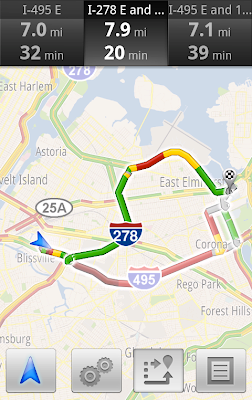
You don’t have to do anything to be routed around traffic; just start Navigation like you normally would, either from the Navigation app or from within Google Maps. Before today, Navigation would choose whichever route was fastest, without taking current traffic conditions into account. It would also generate additional alternate directions, such as the shortest route or one that uses highways instead of side roads. Starting today, our routing algorithms will also apply our knowledge of current and historical traffic to select the fastest route from those alternates. That means that Navigation will automatically guide you along the best route given the current traffic conditions.
Not only can you save time and fuel, you’re making traffic better for everyone else by avoiding traffic jams. Keep in mind that we can’t guarantee that Navigation will be able to find a faster way, but it will always try to get you where you’re going as fast as possible.
You can begin routing around traffic with Google Maps Navigation for Android in North America and Europe where both Navigation and real-time traffic data are available.
Enjoy your newly found free time!
Posted by Roy Williams, Software Engineer, Google Maps Team


 "
"
Ever been stuck in traffic, only to find out you’d have been better off going a bit out of your way to take a less congested route? If you’re like me, you probably hear the traffic report telling you what you already know: traffic is bad on the road you’re currently on, and you should have taken another. It doesn’t need to be this way, and we want to help. So we’re happy to announce that Google Maps Navigation (Beta) will now automatically route you around traffic. With more than 35 million miles driven by Navigation users every day, this should add up to quite a bit of time saved!
On a recent trip to New York, I was running late to meet some friends at the Queens Museum of Art. I had no idea that there was a traffic jam along the route I would normally have taken. Thankfully, Navigation routed me around traffic. I didn’t even have to know that there was a traffic jam on I-495, and I got to enjoy a much faster trip on I-278 instead.

Navigation now uses real-time traffic conditions to automatically route you around traffic.
You don’t have to do anything to be routed around traffic; just start Navigation like you normally would, either from the Navigation app or from within Google Maps. Before today, Navigation would choose whichever route was fastest, without taking current traffic conditions into account. It would also generate additional alternate directions, such as the shortest route or one that uses highways instead of side roads. Starting today, our routing algorithms will also apply our knowledge of current and historical traffic to select the fastest route from those alternates. That means that Navigation will automatically guide you along the best route given the current traffic conditions.
Not only can you save time and fuel, you’re making traffic better for everyone else by avoiding traffic jams. Keep in mind that we can’t guarantee that Navigation will be able to find a faster way, but it will always try to get you where you’re going as fast as possible.
You can begin routing around traffic with Google Maps Navigation for Android in North America and Europe where both Navigation and real-time traffic data are available.
Enjoy your newly found free time!
Posted by Roy Williams, Software Engineer, Google Maps Team
"
Thursday, February 24, 2011
Visualized: Android activations mapped geographically, chronologically, breathtakingly (video)
Visualized: Android activations mapped geographically, chronologically, breathtakingly (video): "
Do you ever wish for an easier way to show your uninitiated friends what you mean when you say Android is growing? Well, here's the video for you: a Google-produced map of the world that throbs with Android activations over time, highlighted by some truly eye-opening flourishes in the immediate aftermath of marquee handset launches. The Google guys have even given us handy countdown timers -- 'Droid launch in 3, 2, 1...' -- and broken things down by continent for easier viewing. Only thing missing is a soundtrack, so just have your Tron: Legacy OST loaded up and ready before jumping past the break.
[Thanks, Leo Z.] Android Central |
  androiddevelopers (YouTube) | Email this | Comments"
Do you ever wish for an easier way to show your uninitiated friends what you mean when you say Android is growing? Well, here's the video for you: a Google-produced map of the world that throbs with Android activations over time, highlighted by some truly eye-opening flourishes in the immediate aftermath of marquee handset launches. The Google guys have even given us handy countdown timers -- 'Droid launch in 3, 2, 1...' -- and broken things down by continent for easier viewing. Only thing missing is a soundtrack, so just have your Tron: Legacy OST loaded up and ready before jumping past the break.
[Thanks, Leo Z.]
Visualized: Android activations mapped geographically, chronologically, breathtakingly (video) originally appeared on Engadget on Thu, 24 Feb 2011 04:09:00 EDT. Please see our terms for use of feeds.
PermalinkAndroid Central | androiddevelopers (YouTube) | Email this | Comments"
Thursday, February 17, 2011
Developer gets Kinect working on Android, rains on Microsoft's WP7 parade (video)
Developer gets Kinect working on Android, rains on Microsoft's WP7 parade (video): "
Windows Phone 7 is getting a lot of extensions this year and, while we wouldn't say Kinect interoperability is anywhere near as important as third-party multitasking, it could be fun. Still, we haven't seen proper Kinect interop, the sort that would see you controlling WP7 games with a Kinect -- the sort that is apparently possible on Android. YouTuber HirotakaSter has managed to hook a Kinect up to Android hardware, what looks to be an Armadillo 500 FX development platform, and get everything to play nice. He's using openFrameworks and, while at this point the software isn't doing much other than showing a video stream from the camera, the possibilities from here are quite simply infinite.
[Thanks, Muhammad Ali]Geekword | KirotakaSter (YouTube) | Email this | Comments"
Windows Phone 7 is getting a lot of extensions this year and, while we wouldn't say Kinect interoperability is anywhere near as important as third-party multitasking, it could be fun. Still, we haven't seen proper Kinect interop, the sort that would see you controlling WP7 games with a Kinect -- the sort that is apparently possible on Android. YouTuber HirotakaSter has managed to hook a Kinect up to Android hardware, what looks to be an Armadillo 500 FX development platform, and get everything to play nice. He's using openFrameworks and, while at this point the software isn't doing much other than showing a video stream from the camera, the possibilities from here are quite simply infinite.
[Thanks, Muhammad Ali]
Continue reading Developer gets Kinect working on Android, rains on Microsoft's WP7 parade (video)
Developer gets Kinect working on Android, rains on Microsoft's WP7 parade (video) originally appeared on Engadget on Wed, 16 Feb 2011 22:58:00 EDT. Please see our terms for use of feeds.
PermalinkGeekword | KirotakaSter (YouTube) | Email this | Comments"
Wednesday, February 9, 2011
HP TouchPad vs. iPad vs. Xoom vs. PlayBook: the tale of the tape
HP TouchPad vs. iPad vs. Xoom vs. PlayBook: the tale of the tape: "
At last, the webOS-empowered TouchPad, HP's answer to the growing tablet market. And make no mistake, it's coming in with guns blazing -- specs-wise, the slate stands up pretty well to the competition currently in play (e.g. iPad) and the other up-and-comers not quite out the gate (e.g. Motorola Xoom and BlackBerry PlayBook). Stacked side-by-side, it's clear Apple's entry is lacking a bit in both memory (256MB vs. 1GB for everyone else) and front-facing camera -- not that we expect that to be the case for all of 2011. When it all comes down to it, what'll set these slates apart will be the platforms and software themselves -- should make for an interesting summer, no? In the meantime, for the nitty-gritty on technical specifications, venture past the break.
At last, the webOS-empowered TouchPad, HP's answer to the growing tablet market. And make no mistake, it's coming in with guns blazing -- specs-wise, the slate stands up pretty well to the competition currently in play (e.g. iPad) and the other up-and-comers not quite out the gate (e.g. Motorola Xoom and BlackBerry PlayBook). Stacked side-by-side, it's clear Apple's entry is lacking a bit in both memory (256MB vs. 1GB for everyone else) and front-facing camera -- not that we expect that to be the case for all of 2011. When it all comes down to it, what'll set these slates apart will be the platforms and software themselves -- should make for an interesting summer, no? In the meantime, for the nitty-gritty on technical specifications, venture past the break.
Continue reading HP TouchPad vs. iPad vs. Xoom vs. PlayBook: the tale of the tape
HP TouchPad vs. iPad vs. Xoom vs. PlayBook: the tale of the tape originally appeared on Engadget on Wed, 09 Feb 2011 16:30:00 EDT. Please see our terms for use of feeds.
Permalink | | Email this | Comments"Monday, October 25, 2010
Samsung Android Event November 8th in NYC
Samsung Android Event November 8th in NYC: "

Samsung has been tearing it up with Android announcements lately and it looks like their streak of robotic sweetness will continue. They wowed us with a multi-carrier launch of the Samsung Galaxy S, launched the most impressive Android Tablet yet with the Samsung Galaxy Tab, and now they’ve announced a November 8th mobile event that will pretty obviously be all about Android:

The image features Android Application icons getting sucked into a vortex that is seemingly surrounded by stock prices and random numbers. I’m not exactly sure what Samsung will be announcing and the only thing they had to say about the matter, in addition to the above image, was:
Join Samsung Mobile for the unveiling of a new Android device.
Based on the image I thought perhaps Samsung would be announcing a store or marketplace of sorts but if they’ll be announcing a new Android DEVICE than it looks like we’ve got a LOT more to which we can look forward. I’m really excited because the holiday season seems to always have the hottest tech and the biggest surprises.
What do you think Samsung will announce?
"Wednesday, October 20, 2010
Android 3.0 due to start hitting tablets in December ahead of January launch
Android 3.0 due to start hitting tablets in December ahead of January launch: " A holiday tradition? Making things out of gingerbread, and Google is doing its part to keep that practice alive according to a report stating Android 3.0 is set to hit some tablets this December. Those will just be early samples destined only to light up the eyes of engineers who've been very, very good this year, but the rest of us naughty boys and girls will get to see those slates when they launch to the public in January. We hear there's a little electronics show happening that time of year, and supposedly HTC, Samsung, and Motorola will be showing their Gingerbread tablets there, amongst others (but not Lenovo, apparently). We can't wait to get a taste.
Update: Thanks to James for pointing out that it's still unclear whether 3.0 is going to be Gingerbread or, indeed, the truly tablet-minded Honeycomb release we're really waiting for. This report states specifically that 3.0 is hitting tablets in December, with 4.0 later in 2011. Is that Gingerbread and Honeycomb, or Honeycomb and Ice Cream? Also, is anyone else hungry?DigiTimes | Email this | Comments"
A holiday tradition? Making things out of gingerbread, and Google is doing its part to keep that practice alive according to a report stating Android 3.0 is set to hit some tablets this December. Those will just be early samples destined only to light up the eyes of engineers who've been very, very good this year, but the rest of us naughty boys and girls will get to see those slates when they launch to the public in January. We hear there's a little electronics show happening that time of year, and supposedly HTC, Samsung, and Motorola will be showing their Gingerbread tablets there, amongst others (but not Lenovo, apparently). We can't wait to get a taste.Update: Thanks to James for pointing out that it's still unclear whether 3.0 is going to be Gingerbread or, indeed, the truly tablet-minded Honeycomb release we're really waiting for. This report states specifically that 3.0 is hitting tablets in December, with 4.0 later in 2011. Is that Gingerbread and Honeycomb, or Honeycomb and Ice Cream? Also, is anyone else hungry?
Android 3.0 due to start hitting tablets in December ahead of January launch originally appeared on Engadget on Wed, 20 Oct 2010 12:21:00 EDT. Please see our terms for use of feeds.
Permalink |DigiTimes | Email this | Comments"
Thursday, September 30, 2010
Six Android browsers enter the ring, only one reigns supreme
Six Android browsers enter the ring, only one reigns supreme: "
Choice is a good thing, and Android users certainly have a lot of choices. Default launcher or Launcher Pro? Fancy animated live wallpaper or static picture of adorable puppies? Stock browser or alternative? It's that last question that has plagued so many, and to offer some guidance PC World pitted six of the Market's top choices against each other. The 2.1 and 2.2 stock browsers entered, along with Skyfire 2.0, Opera Mini, Dolphin HD, and Mozilla Fennec (the pre-beta release of what could bring Firefox to your phone). The winner? Well, you can see the ultimate speed results above, with SkyFire surprisingly trumping Opera Mini, though that one seemingly has 'em beat when it comes to repeat-visits. However, the full story when it comes to things like page rendering and Flash compatibility is naturally a good bit more complex. For those details you'll need to click on through.
[Thanks, Tim]PC World | Email this | Comments"
Choice is a good thing, and Android users certainly have a lot of choices. Default launcher or Launcher Pro? Fancy animated live wallpaper or static picture of adorable puppies? Stock browser or alternative? It's that last question that has plagued so many, and to offer some guidance PC World pitted six of the Market's top choices against each other. The 2.1 and 2.2 stock browsers entered, along with Skyfire 2.0, Opera Mini, Dolphin HD, and Mozilla Fennec (the pre-beta release of what could bring Firefox to your phone). The winner? Well, you can see the ultimate speed results above, with SkyFire surprisingly trumping Opera Mini, though that one seemingly has 'em beat when it comes to repeat-visits. However, the full story when it comes to things like page rendering and Flash compatibility is naturally a good bit more complex. For those details you'll need to click on through.
[Thanks, Tim]
Six Android browsers enter the ring, only one reigns supreme originally appeared on Engadget on Thu, 30 Sep 2010 02:52:00 EDT. Please see our terms for use of feeds.
Permalink |PC World | Email this | Comments"
Friday, August 13, 2010
Chrome to Phone now available in Android Market
Chrome to Phone now available in Android Market: "
Chrome to Phone isn't a new product -- we've been using it since May, in fact -- but Google's second mobile announcement today (behind Voice Actions) is that its continuous client app is now 'official' and available to all users (with Android 2.2 Froyo) via Android Market. As it was before, websites can be pushed from the Chrome browser to your Android device, with certain apps (Maps, YouTube) taking over for the browser when contextually appropriate. Additionally, the code is open, which we're hoping means this Chrome extension will find its way to other browsers. The team is 'looking into' bringing the capabilities to other mobile OSs (the iPhone was specifically asked), but don't get your hopes up: nothing's been submitted, and we didn't get the feeling it was an active push. Incredibly useful? Yes, yes indeed.
Chrome to Phone isn't a new product -- we've been using it since May, in fact -- but Google's second mobile announcement today (behind Voice Actions) is that its continuous client app is now 'official' and available to all users (with Android 2.2 Froyo) via Android Market. As it was before, websites can be pushed from the Chrome browser to your Android device, with certain apps (Maps, YouTube) taking over for the browser when contextually appropriate. Additionally, the code is open, which we're hoping means this Chrome extension will find its way to other browsers. The team is 'looking into' bringing the capabilities to other mobile OSs (the iPhone was specifically asked), but don't get your hopes up: nothing's been submitted, and we didn't get the feeling it was an active push. Incredibly useful? Yes, yes indeed.
Chrome to Phone now available in Android Market originally appeared on Engadget on Thu, 12 Aug 2010 13:29:00 EDT. Please see our terms for use of feeds.
Permalink | | Email this | Comments"Thursday, July 22, 2010
T-Mobile Acknowledges their First HSPA+ Device to be Available This Summer!
T-Mobile Acknowledges their First HSPA+ Device to be Available This Summer!: "

After all of the rumors surrounding T-Mobile’s first HSPA+ device – with just about everyone taking it to be the HTC Vision – T-Mobile’s official corporate Twitter account (for the United States) has given us reassurance that there will be a device out to take advantage of their marvelous new network later this summer.
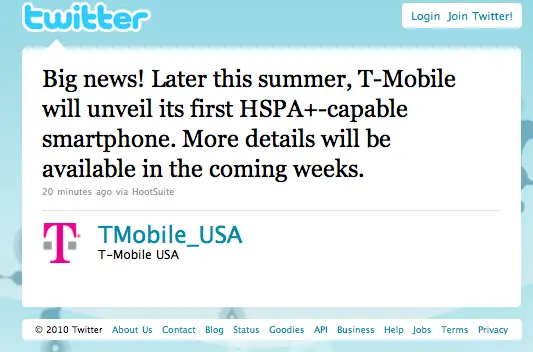
More details will be available in the coming weeks, you say? Well I certainly don’t mind if I do! If all of the rumors surrounding the HTC Vanguard/HTC Vision turn out to be true, then this will be the high-end, subsidized smartphone from HTC that a lot of you on “Magenta” have been waiting for (the Nexus One doesn’t count for various reasons, and I guess some of you just aren’t too big on Samsung’s Galaxy S phone for the carrier: the Samsung Vibrant).
We can’t wait to see what T-Mobile has to offer us as we head into August and expire the summer with September.
[via TmoNews]
"Wednesday, July 21, 2010
Nexus One is sold out in Google's store -- forever
Nexus One is sold out in Google's store -- forever: "
Google warned us that the Nexus One was approaching the end of its days, but we've gotta admit, we didn't realize just how quickly that moment would come. Sure enough, Google's official online store for the phone now just shows an ominous message that 'the Nexus One is no longer available for purchase directly' from the company, which means you're going to have to go through Vodafone, KT in South Korea, or hold out for the units that they plan on selling directly to registered developers. Needless to say, for the bulk of potential customers, the phone is all but history. So, on that note, Nexus One: for your straight-shooting stock Android ways and your unlocked radio, you'll be dearly missed -- and we hope your legacy lives on, even though your retail model does not.
[Thanks, Dan]Google | Email this | Comments"
Google warned us that the Nexus One was approaching the end of its days, but we've gotta admit, we didn't realize just how quickly that moment would come. Sure enough, Google's official online store for the phone now just shows an ominous message that 'the Nexus One is no longer available for purchase directly' from the company, which means you're going to have to go through Vodafone, KT in South Korea, or hold out for the units that they plan on selling directly to registered developers. Needless to say, for the bulk of potential customers, the phone is all but history. So, on that note, Nexus One: for your straight-shooting stock Android ways and your unlocked radio, you'll be dearly missed -- and we hope your legacy lives on, even though your retail model does not.
[Thanks, Dan]
Nexus One is sold out in Google's store -- forever originally appeared on Engadget on Wed, 21 Jul 2010 10:59:00 EDT. Please see our terms for use of feeds.
Permalink |Google | Email this | Comments"
Google: Eclair is on more than half of all Android phones, Froyo bursts onto the scene
Google: Eclair is on more than half of all Android phones, Froyo bursts onto the scene: "
Android 1.5 and 1.6 are still major players in the field, together accounting for some 41 percent of all Google-powered phones in use as of July 15 -- but for the first time, Android 2.1 is on significantly more than half of the phones out there, up from an even 50 percent in mid-June. 55.5 percent of devices are running Eclair to be exact, and Froyo also makes an appearance with a little sliver of 3.3 percent -- an anemic figure obviously hampered by the fact that no one outside Google itself (on the now nearly-defunct Nexus One) has deployed the latest version yet. It's fascinating to see the change in the version mix over time get visualized like this -- now all we need is that dark green line at the very bottom to shoot upwards and obliterate everything else on the graph. Let's make it happen, guys.GigaOM | Android Developers | Email this | Comments"
Android 1.5 and 1.6 are still major players in the field, together accounting for some 41 percent of all Google-powered phones in use as of July 15 -- but for the first time, Android 2.1 is on significantly more than half of the phones out there, up from an even 50 percent in mid-June. 55.5 percent of devices are running Eclair to be exact, and Froyo also makes an appearance with a little sliver of 3.3 percent -- an anemic figure obviously hampered by the fact that no one outside Google itself (on the now nearly-defunct Nexus One) has deployed the latest version yet. It's fascinating to see the change in the version mix over time get visualized like this -- now all we need is that dark green line at the very bottom to shoot upwards and obliterate everything else on the graph. Let's make it happen, guys.
Google: Eclair is on more than half of all Android phones, Froyo bursts onto the scene originally appeared on Engadget on Wed, 21 Jul 2010 13:38:00 EDT. Please see our terms for use of feeds.
PermalinkGigaOM | Android Developers | Email this | Comments"
Tuesday, July 20, 2010
Multithreading For Performance
Multithreading For Performance: "


 "
"
[This post is by Gilles Debunne, an engineer in the Android group who loves to get multitasked. — Tim Bray]

A good practice in creating responsive applications is to make sure your main UI thread does the minimum amount of work. Any potentially long task that may hang your application should be handled in a different thread. Typical examples of such tasks are network operations, which involve unpredictable delays. Users will tolerate some pauses, especially if you provide feedback that something is in progress, but a frozen application gives them no clue.
In this article, we will create a simple image downloader that illustrates this pattern. We will populate a ListView with thumbnail images downloaded from the internet. Creating an asynchronous task that downloads in the background will keep our application fast.
An Image downloader
Downloading an image from the web is fairly simple, using the HTTP-related classes provided by the framework. Here is a possible implementation:
static Bitmap downloadBitmap(String url) {
   final AndroidHttpClient client = AndroidHttpClient.newInstance('Android');
   final HttpGet getRequest = new HttpGet(url);

   try {
       HttpResponse response = client.execute(getRequest);
       final int statusCode = response.getStatusLine().getStatusCode();
       if (statusCode != HttpStatus.SC_OK) {
           Log.w('ImageDownloader', 'Error ' + statusCode + ' while retrieving bitmap from ' + url);
           return null;
       }

       final HttpEntity entity = response.getEntity();
       if (entity != null) {
           InputStream inputStream = null;
           try {
               inputStream = entity.getContent();
               final Bitmap bitmap = BitmapFactory.decodeStream(inputStream);
               return bitmap;
           } finally {
               if (inputStream != null) {
                   inputStream.close();
               }
               entity.consumeContent();
           }
       }
   } catch (Exception e) {
       // Could provide a more explicit error message for IOException or IllegalStateException
       getRequest.abort();
       Log.w('ImageDownloader', 'Error while retrieving bitmap from ' + url, e.toString());
   } finally {
       if (client != null) {
           client.close();
       }
   }
   return null;
}
A client and an HTTP request are created. If the request succeeds, the response entity stream containing the image is decoded to create the resulting Bitmap. Your applications' manifest must ask for the INTERNET to make this possible.
Note: a bug in the previous versions of BitmapFactory.decodeStream may prevent this code from working over a slow connection. Decode a new FlushedInputStream(inputStream) instead to fix the problem. Here is the implementation of this helper class:
static class FlushedInputStream extends FilterInputStream {
   public FlushedInputStream(InputStream inputStream) {
       super(inputStream);
   }

   @Override
   public long skip(long n) throws IOException {
       long totalBytesSkipped = 0L;
       while (totalBytesSkipped < n) {
           long bytesSkipped = in.skip(n - totalBytesSkipped);
           if (bytesSkipped == 0L) {
                 int byte = read();
                 if (byte < 0) {
                     break;  // we reached EOF
                 } else {
                     bytesSkipped = 1; // we read one byte
                 }
          }
           totalBytesSkipped += bytesSkipped;
       }
       return totalBytesSkipped;
   }
}
This ensures that skip() actually skips the provided number of bytes, unless we reach the end of file.
If you were to directly use this method in your ListAdapter's getView method, the resulting scrolling would be unpleasantly jaggy. Each display of a new view has to wait for an image download, which prevents smooth scrolling.
Indeed, this is such a bad idea that the AndroidHttpClient does not allow itself to be started from the main thread. The above code will display 'This thread forbids HTTP requests' error messages instead. Use the DefaultHttpClient instead if you really want to shoot yourself in the foot.
Introducing asynchronous tasks
The AsyncTask class provides one of the simplest ways to fire off a new task from the UI thread. Let's create an ImageDownloader class which will be in charge of creating these tasks. It will provide a download method which will assign an image downloaded from its URL to an ImageView:
public class ImageDownloader {

   public void download(String url, ImageView imageView) {
           BitmapDownloaderTask task = new BitmapDownloaderTask(imageView);
           task.execute(url);
       }
   }

   /* class BitmapDownloaderTask, see below */
}
The BitmapDownloaderTask is the AsyncTask which will actually download the image. It is started using execute, which returns immediately hence making this method really fast which is the whole purpose since it will be called from the UI thread. Here is the implementation of this class:
class BitmapDownloaderTask extends AsyncTask<String, Void, Bitmap> {
   private String url;
   private final WeakReference<ImageView> imageViewReference;

   public BitmapDownloaderTask(ImageView imageView) {
       imageViewReference = new WeakReference<ImageView>(imageView);
   }

   @Override
   // Actual download method, run in the task thread
   protected Bitmap doInBackground(String... params) {
        // params comes from the execute() call: params[0] is the url.
        return downloadBitmap(params[0]);
   }

   @Override
   // Once the image is downloaded, associates it to the imageView
   protected void onPostExecute(Bitmap bitmap) {
       if (isCancelled()) {
           bitmap = null;
       }

       if (imageViewReference != null) {
           ImageView imageView = imageViewReference.get();
           if (imageView != null) {
               imageView.setImageBitmap(bitmap);
           }
       }
   }
}
The doInBackground method is the one which is actually run in its own process by the task. It simply uses the downloadBitmap method we implemented at the beginning of this article.
onPostExecute is run in the calling UI thread when the task is finished. It takes the resulting Bitmap as a parameter, which is simply associated with the imageView that was provided to download and was stored in the BitmapDownloaderTask. Note that this ImageView is stored as a WeakReference, so that a download in progress does not prevent a killed activity's ImageView from being garbage collected. This explains why we have to check that both the weak reference and the imageView are not null (i.e. were not collected) before using them in onPostExecute.
This simplified example illustrates the use on an AsyncTask, and if you try it, you'll see that these few lines of code actually dramatically improved the performance of the ListView which now scrolls smoothly. Read Painless threading for more details on AsyncTasks.
However, a ListView-specific behavior reveals a problem with our current implementation. Indeed, for memory efficiency reasons, ListView recycles the views that are displayed when the user scrolls. If one flings the list, a given ImageView object will be used many times. Each time it is displayed the ImageView correctly triggers an image download task, which will eventually change its image. So where is the problem? As with most parallel applications, the key issue is in the ordering. In our case, there's no guarantee that the download tasks will finish in the order in which they were started. The result is that the image finally displayed in the list may come from a previous item, which simply happened to have taken longer to download. This is not an issue if the images you download are bound once and for all to given ImageViews, but let's fix it for the common case where they are used in a list.
Handling concurrency
To solve this issue, we should remember the order of the downloads, so that the last started one is the one that will effectively be displayed. It is indeed sufficient for each ImageView to remember its last download. We will add this extra information in the ImageView using a dedicated Drawable subclass, which will be temporarily bind to the ImageView while the download is in progress. Here is the code of our DownloadedDrawable class:
static class DownloadedDrawable extends ColorDrawable {
   private final WeakReference<BitmapDownloaderTask> bitmapDownloaderTaskReference;

   public DownloadedDrawable(BitmapDownloaderTask bitmapDownloaderTask) {
       super(Color.BLACK);
       bitmapDownloaderTaskReference =
           new WeakReference<BitmapDownloaderTask>(bitmapDownloaderTask);
   }

   public BitmapDownloaderTask getBitmapDownloaderTask() {
       return bitmapDownloaderTaskReference.get();
   }
}
This implementation is backed by a ColorDrawable, which will result in the ImageView displaying a black background while its download is in progress. One could use a “download in progress” image instead, which would provide feedback to the user. Once again, note the use of a WeakReference to limit object dependencies.
Let's change our code to take this new class into account. First, the download method will now create an instance of this class and associate it with the imageView:
public void download(String url, ImageView imageView) {
    if (cancelPotentialDownload(url, imageView)) {
        BitmapDownloaderTask task = new BitmapDownloaderTask(imageView);
        DownloadedDrawable downloadedDrawable = new DownloadedDrawable(task);
        imageView.setImageDrawable(downloadedDrawable);
        task.execute(url, cookie);
    }
}
The cancelPotentialDownload method will stop the possible download in progress on this imageView since a new one is about to start. Note that this is not sufficient to guarantee that the newest download is always displayed, since the task may be finished, waiting in its onPostExecute method, which may still may be executed after the one of this new download.
private static boolean cancelPotentialDownload(String url, ImageView imageView) {
   BitmapDownloaderTask bitmapDownloaderTask = getBitmapDownloaderTask(imageView);

   if (bitmapDownloaderTask != null) {
       String bitmapUrl = bitmapDownloaderTask.url;
       if ((bitmapUrl == null) || (!bitmapUrl.equals(url))) {
           bitmapDownloaderTask.cancel(true);
       } else {
           // The same URL is already being downloaded.
           return false;
       }
   }
   return true;
}
cancelPotentialDownload uses the cancel method of the AsyncTask class to stop the download in progress. It returns true most of the time, so that the download can be started in download. The only reason we don't want this to happen is when a download is already in progress on the same URL in which case we let it continue. Note that with this implementation, if an ImageView is garbage collected, its associated download is not stopped. A RecyclerListener might be used for that.
This method uses a helper getBitmapDownloaderTask function, which is pretty straigthforward:
private static BitmapDownloaderTask getBitmapDownloaderTask(ImageView imageView) {
   if (imageView != null) {
       Drawable drawable = imageView.getDrawable();
       if (drawable instanceof DownloadedDrawable) {
           DownloadedDrawable downloadedDrawable = (DownloadedDrawable)drawable;
           return downloadedDrawable.getBitmapDownloaderTask();
       }
   }
   return null;
}
Finally, onPostExecute has to be modified so that it will bind the Bitmap only if this ImageView is still associated with this download process:
if (imageViewReference != null) {
   ImageView imageView = imageViewReference.get();
   BitmapDownloaderTask bitmapDownloaderTask = getBitmapDownloaderTask(imageView);
   // Change bitmap only if this process is still associated with it
   if (this == bitmapDownloaderTask) {
       imageView.setImageBitmap(bitmap);
   }
}
With these modifications, our ImageDownloader class provides the basic services we expect from it. Feel free to use it or the asynchronous pattern it illustrates in your applications to ensure their responsiveness.
Demo
The source code of this article is available online on Google Code. You can switch between and compare the three different implementations that are described in this article (no asynchronous task, no bitmap to task association and the final correct version). Note that the cache size has been limited to 10 images to better demonstrate the issues.

Future work
This code was simplified to focus on its parallel aspects and many useful features are missing from our implementation. The ImageDownloader class would first clearly benefit from a cache, especially if it is used in conjuction with a ListView, which will probably display the same image many times as the user scrolls back and forth. This can easily be implemented using a Least Recently Used cache backed by a LinkedHashMap of URL to Bitmap SoftReferences. More involved cache mechanism could also rely on a local disk storage of the image. Thumbnails creation and image resizing could also be added if needed.
Download errors and time-outs are correctly handled by our implementation, which will return a null Bitmap in these case. One may want to display an error image instead.
Our HTTP request is pretty simple. One may want to add parameters or cookies to the request as required by certain web sites.
The AsyncTask class used in this article is a really convenient and easy way to defer some work from the UI thread. You may want to use the Handler class to have a finer control on what you do, such as controlling the total number of download threads which are running in parallel in this case.
"
Adobe FlashTime to bring peer-to-peer video calls to Android (video)
Adobe FlashTime to bring peer-to-peer video calls to Android (video): "
With tongue wedged firmly in cheek, Adobe has named its latest little bit of demo software FlashTime and given it a quick spin to whet our appetites. Built using the forthcoming Air 2.5, this peer-to-peer video chat client harnesses your smartphone's camera to get some direct visual communication going with your fellow Android lovers. Okay, so Android users already have other options for doing just this very thing, but the point being made here is that you can do just about anything with Flash, and since it's Flash it'll be easy to port around to other platforms. Skip past the break to see the demo, which has a multipeer chat session with a desktop Mac thrown in for good measure.
[Thanks, Faheem]Hexus.net | Mark Doherty (Vimeo) | Email this | Comments"
With tongue wedged firmly in cheek, Adobe has named its latest little bit of demo software FlashTime and given it a quick spin to whet our appetites. Built using the forthcoming Air 2.5, this peer-to-peer video chat client harnesses your smartphone's camera to get some direct visual communication going with your fellow Android lovers. Okay, so Android users already have other options for doing just this very thing, but the point being made here is that you can do just about anything with Flash, and since it's Flash it'll be easy to port around to other platforms. Skip past the break to see the demo, which has a multipeer chat session with a desktop Mac thrown in for good measure.
[Thanks, Faheem]
Continue reading Adobe FlashTime to bring peer-to-peer video calls to Android (video)
Adobe FlashTime to bring peer-to-peer video calls to Android (video) originally appeared on Engadget on Tue, 20 Jul 2010 11:52:00 EDT. Please see our terms for use of feeds.
PermalinkHexus.net | Mark Doherty (Vimeo) | Email this | Comments"
Monday, July 12, 2010
Android App Inventor lets you be the developer (video)
Android App Inventor lets you be the developer (video): "
Google is following in Nokia's footsteps today by offering its users a simple-to-use DIY app maker. Employing a design scheme that relies on visual blocks rather than oodles of arcane code, the App Inventor -- still in Beta, of course -- has functions for 'just about anything' you can do with an Android handset, including access to GPS and phone functionality. All that's really missing is the raw creative talent, which we're sure you'll be happy to provide. Hit the source link to get involved or skip past the break for an educational video.App Inventor | Email this | Comments"
Google is following in Nokia's footsteps today by offering its users a simple-to-use DIY app maker. Employing a design scheme that relies on visual blocks rather than oodles of arcane code, the App Inventor -- still in Beta, of course -- has functions for 'just about anything' you can do with an Android handset, including access to GPS and phone functionality. All that's really missing is the raw creative talent, which we're sure you'll be happy to provide. Hit the source link to get involved or skip past the break for an educational video.
Continue reading Android App Inventor lets you be the developer (video)
Android App Inventor lets you be the developer (video) originally appeared on Engadget on Mon, 12 Jul 2010 04:02:00 EDT. Please see our terms for use of feeds.
Permalink |App Inventor | Email this | Comments"
Thursday, July 8, 2010
Ubuntu joins Android on Nexus One, apocalyptic repercussions nowhere to be found
Ubuntu joins Android on Nexus One, apocalyptic repercussions nowhere to be found: "
Ever wondered what would happen if you threw another mobile OS onto your Nexus One? Without removing Android? Contrary to popular belief, the world will in fact not end, and in many cases, lives could very well be improved. One particular modder over at Nexus One Hacks has managed to put together a video how-to demonstrating the installation of Ubuntu as a secondary OS on his rooted N1, and while you'll obviously find yourself dealing with a few incompatibilities should you follow suit, it's not like you really have anything better to do tonight than tinker. Right? Right. Jump on past the break and mash play to get going.Geekword | Nexus One Hacks | Email this | Comments"
Ever wondered what would happen if you threw another mobile OS onto your Nexus One? Without removing Android? Contrary to popular belief, the world will in fact not end, and in many cases, lives could very well be improved. One particular modder over at Nexus One Hacks has managed to put together a video how-to demonstrating the installation of Ubuntu as a secondary OS on his rooted N1, and while you'll obviously find yourself dealing with a few incompatibilities should you follow suit, it's not like you really have anything better to do tonight than tinker. Right? Right. Jump on past the break and mash play to get going.
Continue reading Ubuntu joins Android on Nexus One, apocalyptic repercussions nowhere to be found
Ubuntu joins Android on Nexus One, apocalyptic repercussions nowhere to be found originally appeared on Engadget on Thu, 08 Jul 2010 18:01:00 EDT. Please see our terms for use of feeds.
PermalinkGeekword | Nexus One Hacks | Email this | Comments"
Wednesday, July 7, 2010

Wednesday, June 30, 2010
Android 3.0 Gingerbread getting revamped UI, Froyo living on for lower-end phones?
Android 3.0 Gingerbread getting revamped UI, Froyo living on for lower-end phones?: " Last we'd heard, the next major release of Android -- codename Gingerbread -- was scheduled for a fourth-quarter launch, but the always-entertaining Eldar Murtazin has apparently just spilled a few details on what he knows of the release on a Russian podcast. Most notably, the dude says that we can expect an entirely revamped UI -- the first that the platform will have undergone since its introduction -- and will take cues from the fancy 3D Gallery app launched with Eclair. There's said to be a new 1280 x 760 resolution available for devices larger than 4 inches, which would dovetail nicely with Verizon's desire to bring a bunch of Android tablets to market. Like Windows Phone 7, Murtazin claims that Google will be laying down the law with some hardcore hardware specs to run 3.0, demanding a minimum of a 3.5-inch display, a 1GHz processor, and 512MB of RAM -- so what about cheaper devices? Well, those will apparently continue to run Android 2.1 or 2.2, which sounds like yet another serious recipe for platform fragmentation from the outset. We'll apparently see the first devices launch in time for the holidays following an October introduction, which lines up with what we've heard so far. Needless to say, we'll be keeping a close eye on this one.
[Thanks, John]Gizmodo, Unwired View | Digestiv | Email this | Comments"
Last we'd heard, the next major release of Android -- codename Gingerbread -- was scheduled for a fourth-quarter launch, but the always-entertaining Eldar Murtazin has apparently just spilled a few details on what he knows of the release on a Russian podcast. Most notably, the dude says that we can expect an entirely revamped UI -- the first that the platform will have undergone since its introduction -- and will take cues from the fancy 3D Gallery app launched with Eclair. There's said to be a new 1280 x 760 resolution available for devices larger than 4 inches, which would dovetail nicely with Verizon's desire to bring a bunch of Android tablets to market. Like Windows Phone 7, Murtazin claims that Google will be laying down the law with some hardcore hardware specs to run 3.0, demanding a minimum of a 3.5-inch display, a 1GHz processor, and 512MB of RAM -- so what about cheaper devices? Well, those will apparently continue to run Android 2.1 or 2.2, which sounds like yet another serious recipe for platform fragmentation from the outset. We'll apparently see the first devices launch in time for the holidays following an October introduction, which lines up with what we've heard so far. Needless to say, we'll be keeping a close eye on this one.[Thanks, John]
Android 3.0 Gingerbread getting revamped UI, Froyo living on for lower-end phones? originally appeared on Engadget on Wed, 30 Jun 2010 13:15:00 EDT. Please see our terms for use of feeds.
PermalinkGizmodo, Unwired View | Digestiv | Email this | Comments"
Tuesday, June 29, 2010
Cisco unveils Cius Android tablet with HD video capabilities
Cisco unveils Cius Android tablet with HD video capabilities: "
Cisco's just announced a business-aimed Android tablet, and it's calling it the Cius. The tablet will offer HD video streaming, real-time video, multi-party conferencing, plus all the regular tablet functions like messaging, email, and browsing. We're not sure about the size of the device yet, or any of it technical specs, but we do know that it's going to weigh in at 1.15lbs, so it can't be terrifically large. There's also no word yet on pricing or availability yet either but we'll let you know as soon as we do, okay, businessmen? Full press release is below.
Cisco's just announced a business-aimed Android tablet, and it's calling it the Cius. The tablet will offer HD video streaming, real-time video, multi-party conferencing, plus all the regular tablet functions like messaging, email, and browsing. We're not sure about the size of the device yet, or any of it technical specs, but we do know that it's going to weigh in at 1.15lbs, so it can't be terrifically large. There's also no word yet on pricing or availability yet either but we'll let you know as soon as we do, okay, businessmen? Full press release is below.
Continue reading Cisco unveils Cius Android tablet with HD video capabilities
Cisco unveils Cius Android tablet with HD video capabilities originally appeared on Engadget on Tue, 29 Jun 2010 14:21:00 EDT. Please see our terms for use of feeds.
Permalink | | Email this | Comments"Android 2.2 Froyo FRF85 now available for Nexus One (update: official)
Android 2.2 Froyo FRF85 now available for Nexus One (update: official): "
We've been receiving numerous tips over the last hour that Nexus One owners on AT&T bands are receiving an over-the-air update for Android 2.2 FRF85, otherwise known as the 'bulletproofed' Froyo build. No confirmation at this point, and since you're asking, no word yet either on an update for the larger T-Mobile N1 install base (though we've had at least one report of a user on FRF50 getting the OTA today). We've pinged Google for answers, will let ya know what we hear.
Update: Thanks to a few readers, we've now got a direct link from Google's servers to update from EPE54B to FRF85.
Update 2: Tipster Christian R has sent us a picture of his T-Mobile-banded Nexus One with FRF85, apparently updated from Android 2.1 build ERE27. Has the T-Mobile rollout begun? Not for us, at least.
Update 3: And now we've got a direct link to download a FRF85 build that'll supposedly work for any Android build. We can safely say that it worked for us on a T-Mobile device with 2.1 / ERE27. Download from Google here, and if you need direction on how to do the update yourself, take a cue from our commenters. [Thanks, MRCUR and afinite]
Update 4: And now it's official. Keep an eye on that notification bar if you're itching for the OTA method. So that's one phone down, quite a few to go! [Thanks, cl]
[Thanks to everyone who sent this in]
We've been receiving numerous tips over the last hour that Nexus One owners on AT&T bands are receiving an over-the-air update for Android 2.2 FRF85, otherwise known as the 'bulletproofed' Froyo build. No confirmation at this point, and since you're asking, no word yet either on an update for the larger T-Mobile N1 install base (though we've had at least one report of a user on FRF50 getting the OTA today). We've pinged Google for answers, will let ya know what we hear.
Update: Thanks to a few readers, we've now got a direct link from Google's servers to update from EPE54B to FRF85.
Update 2: Tipster Christian R has sent us a picture of his T-Mobile-banded Nexus One with FRF85, apparently updated from Android 2.1 build ERE27. Has the T-Mobile rollout begun? Not for us, at least.
Update 3: And now we've got a direct link to download a FRF85 build that'll supposedly work for any Android build. We can safely say that it worked for us on a T-Mobile device with 2.1 / ERE27. Download from Google here, and if you need direction on how to do the update yourself, take a cue from our commenters. [Thanks, MRCUR and afinite]
Update 4: And now it's official. Keep an eye on that notification bar if you're itching for the OTA method. So that's one phone down, quite a few to go! [Thanks, cl]
[Thanks to everyone who sent this in]
Android 2.2 Froyo FRF85 now available for Nexus One (update: official) originally appeared on Engadget on Mon, 28 Jun 2010 23:59:00 EDT. Please see our terms for use of feeds.
Permalink | | Email this | Comments"Monday, June 28, 2010
Developers to get native x86 version of Android 2.2 this summer?
Developers to get native x86 version of Android 2.2 this summer?: "
Notebook Italia | APC | Email this | Comments"
We knew that Intel had designs on Android for its Moorestown CPU, and as you might have guessed, the company's plans don't stop there. Renee James, a Senior VP at Intel, recently said as much in a conversation with APC. Apparently, devs can look forward to seeing a fully native x86 version of Froyo at some point this summer. James goes on to say that 'all of the code will be fed back into the open branch that will be created for x86.' Awesome! Perhaps 2011 will see a flood of generic, Atom-powered Android tablets. Because we don't see enough generic Android tablets as it is.
Developers to get native x86 version of Android 2.2 this summer? originally appeared on Engadget on Mon, 28 Jun 2010 11:51:00 EDT. Please see our terms for use of feeds.
PermalinkNotebook Italia | APC | Email this | Comments"
Subscribe to:
Posts (Atom)
